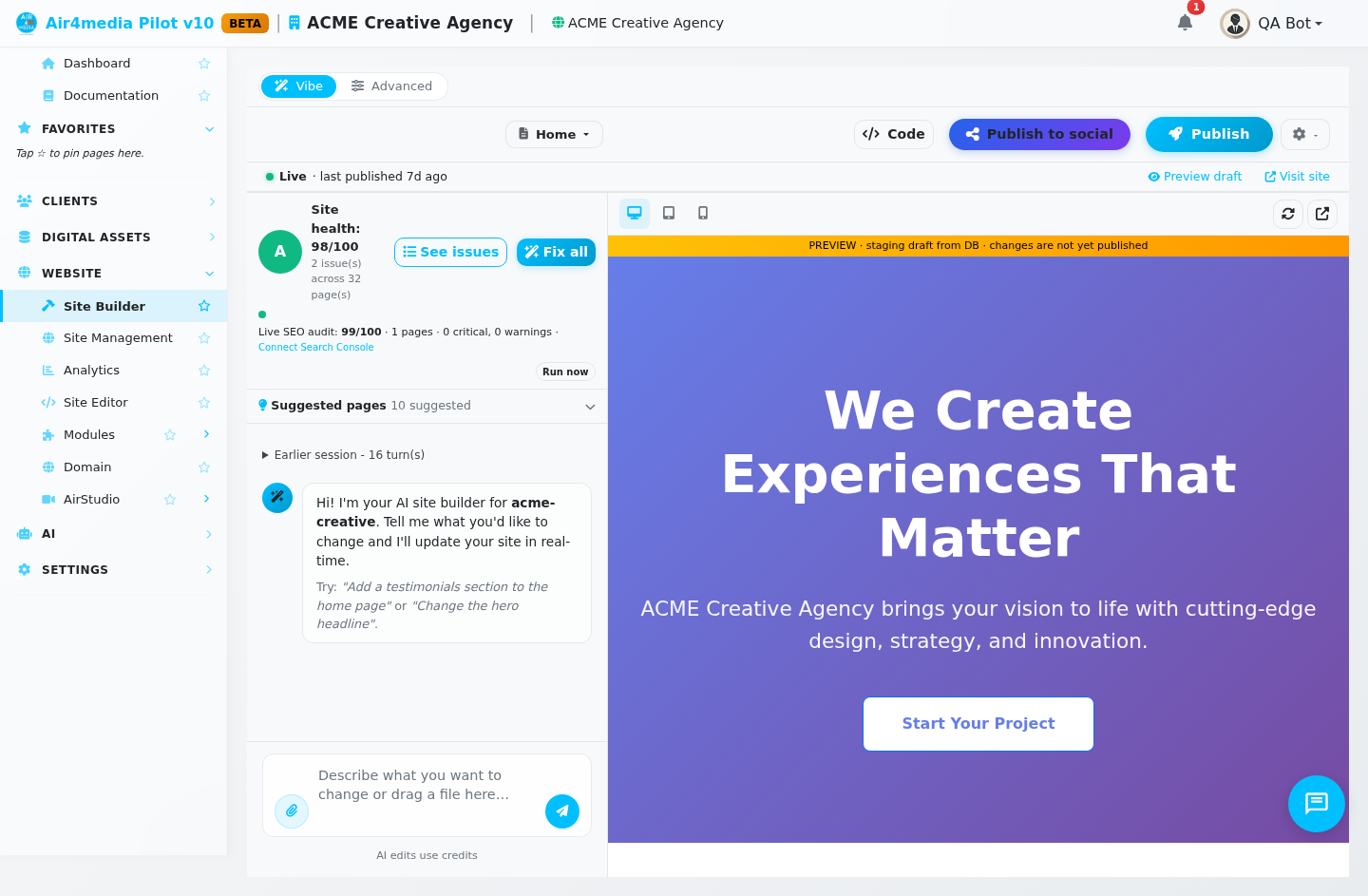
Site Builder is your visual website builder inside Pilot. Describe what you want in plain language, the AI edits your site, and nothing reaches the public until you click Publish. No coding required.
Key Features
- Vibe mode: a chat panel beside a live preview of your draft. Ask for anything ("add a testimonials section", "change the hero headline"), watch the plan stream in, and see the edit land in the preview right away. Attach images, video, an HTML mockup, a PDF or a text file to any message. Your conversation comes back when you return, folded into an "Earlier session" block.
- Advanced mode: turns the preview into an editable map. Sections get a pink dashed outline with a name badge; headings, buttons, images and text get orange badges. Click any of them for a menu of edits, or click text and type over it in place (Enter saves, Escape cancels). Hover between two sections and a pink "+" line appears so you can add a section exactly there. Images offer "Replace this image" and "Edit alt text"; photo sections open a picture manager for adding and reordering shots.
- Site Settings (More menu): a Design tab for brand colors and heading/body fonts, and an Identity tab for site title, tagline, contact email, footer text, logo (light and dark), favicon, social sharing image and social links. All of it applies site-wide.
- Activity & History (More menu): every change logged with the page it touched and a button to restore that page. The "View changes" link after each AI edit opens the same panel, and a Backups tab lists your publish restore points.
- Publish: one button. A safety check runs first, looking for problems such as two pages sharing an address, published pages with nothing on them, or a page that suddenly lost most of its content. If it finds one, the publish stops and names the page and the problem. Publishing a live site takes an automatic restore point first.
- Site health: a chip showing your score out of 100 and the issue count. "See issues" lists them; "Fix all" repairs what it can (page titles, descriptions, image versions) and says what still needs a person. Your live SEO audit result shows here too.
- Module sections: if a module is switched on for your site, ask for it in chat ("add a pricing section") and the builder drops in the live widget rather than static markup. Available for plans and pricing, forms, blog, gallery, booking and reviews, and it stays in sync with the module by itself.
How to Use
- Open Site Builder. You land in Vibe mode: chat on one side, your draft site on the other.
- Type what you want. The AI shows its plan, applies it to the draft, and the preview refreshes. Attach a photo or a mockup whenever you want it used.
- Switch to Advanced when you would rather point than describe, or to drop a new section between two existing ones. It also holds an Explorer view of all your pages.
- Use the More menu for Site Settings (colors, fonts, logo, social links) and for Activity & History.
- Click Publish when the draft is right. That is the only moment your public site changes.
Credits
AI work uses your AI credits, and your balance is shown before every AI action.
- 5 credits per request in the Vibe chat
- 3 credits to edit a single page with AI
- 10 credits to generate a whole new page
- 12 credits to generate a site design preview, then 15 more to build the site from the design you pick
- 3 to 5 credits when the AI has to create a brand new image (it reuses your asset library first when it can)
How Images Stay Editable
Pictures are references to items in your asset library rather than fixed web addresses, resolved when the page is rendered, so replacing the file replaces it everywhere. Photo strips such as heroes, sliders and galleries point at a named album instead of individual files: add, reorder or remove photos in that album and every page using it updates on its own.
Tips
- Vibe mode to describe what you want, Advanced mode to point at the exact thing.
- Set colors and fonts in Site Settings before asking for a lot of new pages, so everything is generated on-brand.
- Nothing is public until you Publish, so experiment freely.